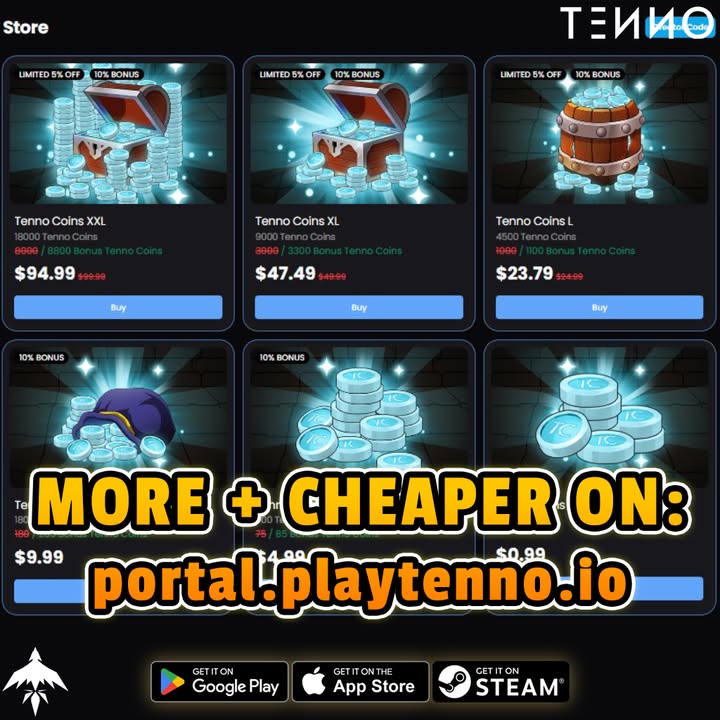
Black Friday Double TC Bonus – Final 24 Hours
The Resurge Games Portal is running the last‑day of its Black Friday promotion. For the next 24 hours every Tenno Credits (TC) purchase grants double the normal amount. This guide explains exactly what the sale includes, how to claim the bonus on each platform, and strategies to make the most of your TC before the timer expires.
Overview of the Promotion
- What you receive: Every TC pack bought through the portal instantly credits twice the usual amount to your account.
- Time limit: The offer ends exactly 24 hours after the announcement; a live countdown is displayed on the portal page.
- Eligibility: The bonus applies to purchases made on iOS, Android, and PC (Steam) as long as the transaction originates from the Resurge Games Portal link.
- No coupon needed: The double‑credit multiplier is applied automatically at checkout.
Promotion Details
| Feature | Details |
|---|---|
| Bonus multiplier | 2× TC for every pack |
| Applicable packs | All standard TC bundles (e.g., 1 000, 5 000, 10 000) |
| Purchase source | Must be initiated via the Resurge Games Portal link |
| Account requirement | You must be logged into the Tenno account you wish to credit |
| Refund policy | Standard store refund rules apply; refunded purchases do not retain the bonus |
The promotion is a one‑time Black Friday event; it will not repeat until a future announcement.
How to Purchase – Step‑by‑Step Guide
- Open the Resurge Games Portal – Click the official promotion link from Tenno’s website or social channels.
- Sign in – Ensure you are logged into the Tenno account you want to credit. The portal shows your current TC balance for confirmation.
- Select a TC pack – Choose the amount that fits your upcoming needs (bulk packs give the best value per credit).
- Proceed to checkout – You will be redirected to the appropriate storefront (App Store, Play Store, or Steam).
- Complete the transaction – Follow the store’s payment flow. Once the purchase is confirmed, the portal credits double the TC to your account instantly.
- Verify the credit – Return to the portal or open the in‑game store to confirm the doubled amount appears before the countdown ends.
Common Pitfalls
- Wrong account: The bonus is applied only to the account active in the portal session. Double‑check the displayed username before purchasing.
- Interrupted checkout: If the store page closes before the transaction completes, the purchase will not be counted.
- Late verification: Verify your balance immediately after purchase; if the double credit does not appear before the timer ends, contact support with proof of purchase.
Platform‑Specific Guides
iOS / iPadOS (App Store)
- Open the portal on your device, sign in, and tap Buy on App Store.
- The App Store will handle payment; after Apple confirms the sale, the portal updates your TC balance.
- Apple receipts are sent to your Apple ID email – keep them for any support inquiries.
Android (Google Play Store)
- Use the portal on a supported Android device or Chrome.
- Tap Buy on Play Store and follow Google’s payment flow.
- Google Play will display a confirmation screen; once accepted, the portal credits the doubled TC.
PC (Steam)
- Launch the portal in a web browser on your PC and log in.
- Click Buy on Steam; the Steam overlay will appear for payment.
- After Steam processes the purchase, the portal instantly adds the double TC to your Tenno account.
All three storefronts respect the promotion as long as the purchase originates from the portal link.
Maximizing Your Tenno Credits
1. Bulk Purchases
Larger TC bundles provide the lowest cost per credit. With the 2× multiplier, buying the biggest pack you can afford yields the greatest net gain.
2. Plan Future Expenditures
- Tenno Pass: The Pass costs a fixed amount of TC each season. Stock up now to avoid paying full price later.
- Prime Parts & Warframes: Many high‑value items in the Warframe Store require TC. Identify upcoming releases and reserve credits.
- Event Entrances: Seasonal events often have entry fees or exclusive bundles purchasable with TC.
3. Verify Before the Clock Runs Out
After each purchase, open the in‑game store or the portal’s balance view. If the doubled amount is missing, repeat the verification steps or submit a support ticket before the timer expires.
4. Keep an Eye on Official Channels
Tenno’s social media and Discord may announce last‑minute extensions or related offers. Subscribing ensures you don’t miss a chance to extend your credit haul.
Expanded FAQ
Q: Does the double bonus apply to all TC packs?
A: Yes, every TC pack purchased through the portal during the promotion receives twice the normal amount.
Q: Can I use the bonus on multiple accounts?
A: The bonus is applied only to the account you are logged into when you complete the purchase.
Q: What happens if my purchase fails after the timer ends?
A: Only successful transactions completed before the countdown expires receive the double credit.
Q: Is there a limit to how much TC I can buy?
A: No platform‑imposed limit beyond each store’s standard purchase caps.
Q: Will the promotion return after Black Friday?
A: This specific double‑bonus offer is a one‑time Black Friday event.
Q: How do I check that the double credit was applied?
A: Open the portal’s balance view or the in‑game store; the TC amount should reflect the 2× increase immediately after purchase.
Q: Can I combine this promotion with other sales?
A: The double‑bonus multiplier replaces any other TC discounts; only one promotion applies per purchase.
Using Your TC After the Sale
Once you have stocked up, you can spend your credits on a variety of in‑game content:
- Warframe Store – Purchase new Warframes, weapons, and cosmetics.
- Tenno Pass – Unlock seasonal rewards and exclusive items.
- Prime Vault – Acquire Prime parts for crafting high‑tier gear.
- Event Tickets – Join limited‑time events that require TC for entry.
Having a surplus of TC gives you flexibility to chase the items you want without waiting for future sales.
For the latest updates, follow Tenno’s official Twitter, Discord, and the Resurge Games Portal announcement page.